National ID Verification API
This document highlights the National ID Verification API details.
API Description
Objective
The National ID Verification API allows you to verify and extract information from national ID cards. It is used to detect and validate Vietnam National IDs in images or PDF files.
API URL
https://vnm-docs.hyperverge.co/v2/nationalID
API Endpoint
nationalID
Overview
The API is RESTful, utilizing standard HTTP verbs and status codes. Responses are provided in JSON format, and all images and files must be uploaded as form-data via a POST request.
Authentication
To access the API, you must obtain a unique pair of application ID (appId) and application key (appKey) from HyperVerge for identity verification.
Method - POST
Headers
| Parameter | Mandatory or Optional | Description | Allowed Values |
|---|---|---|---|
| content-type | Mandatory | This parameter defines the media type for the request payload | application/json |
| appId | Mandatory | The application identifier shared by HyperVerge. You can find the details in the dashboard's credentials tab. | This should be a unique value. |
| appKey | Mandatory | The application key shared by HyperVerge. You can find the details in the dashboard's credentials tab. | This should be a unique value. |
| transactionId | Mandatory | A unique identifier for tracking a complainant journey | This should be both unique and easily associated with the complainant's journey in your application(s) |
Input
The following table outlines the parameters required in the API's request body:
| Parameter | Description | Mandatory or Optional | Allowed Values | Default Value |
|---|---|---|---|---|
image | The image or PDF file containing the national ID | Mandatory | Not Applicable | Not Applicable |
Request
The following code snippet demonstrates a standard curl request for the API:
curl --location --request POST 'https://vnm-docs.hyperverge.co/v2/nationalID' \
--header 'Content-Type: multipart/form-data' \
--header 'appId: <Enter_the_HyperVerge_appId>' \
--header 'appKey: <Enter_the_HyperVerge_appKey>' \
--header 'transactionId: <Enter_the_HyperVerge_transactionID>' \
--form 'image=@"<path_to_image_file>"'
Success Response
The following JSON code snippet demonstrates a success response from the API:
{
  "status": "success",
  "statusCode": "200",
  "requestId": "<Request_ID>",
  "transactionId": "<Transaction_ID>",
  "result": {
    "details": [
      {
        "type": "cmnd_old_front/cmnd_old_back/cmnd_new_front/cccd_front/cmnd_new_cccd_back/cccd_chip_front/cccd_chip_back",
        "fieldsExtracted": {
          "name": {
            "to-be-reviewed": "no",
            "value": "<Name of the User>"
          },
          "dob": {
            "to-be-reviewed": "no",
            "value": "<Date_of_Birth>"
          },
          "idNumber": {
            "to-be-reviewed": "no",
            "value": "<Card_ID>"
          },
          "permanentAddress": {
            "to-be-reviewed": "no",
            "value": "<Address>",
            "province": "<Province>",
            "provinceCode": "<Province_Code>",
            "district": "<District>",
            "districtCode": "<District_Code>",
            "ward": "<Ward>"
          },
          "province": {
            "value": "<Province>"
          },
          "homeTown": {
            "value": "<Home_Town>",
            "to-be-reviewed": "yes"
          },
          "nationality": {
            "value": "Việt Nam <Only_for_Citizen_ID>",
            "to-be-reviewed": "no"
          },
          "gender": {
            "value": "F/M <Only for New National ID or Citizen ID>",
            "to-be-reviewed": "no"
          },
          "doe": {
            "value": "12-08-2027 <Only for New National ID or Citizen ID>",
            "to-be-reviewed": "no"
          }
        },
        "alignedDocumentURL": "<Cropped & aligned document>",
        "ocrMatchWithUserInput": {
          "name": "yes",
          "dob": "yes",
          "idNumber": "yes",
          "all": "yes"
        },
        "ruleChecks": {
          "idProvinceCodeInvalid": {
            "value": "yes",
            "to-be-reviewed": "no"
          },
          "idDOBGenderCodeInvalid": {
            "value": "yes",
            "to-be-reviewed": "no"
          },
          "idNumberLengthMismatch":{
            "value": "yes",
            "to-be-reviewed": "no"
          },
          "expiredID": {
            "value": "yes",
            "daysToExpire": -45
          }
        },
        "tamperChecks": {
          "photoTampered": {
            "to-be-reviewed": "yes",
            "value": "no"
          },
          "idNumberTampered": {
            "to-be-reviewed": "yes",
            "value": "no"
          },
          "dobTampered": {
            "to-be-reviewed": "yes",
            "value": "no"
          },
          "emblemTampered": {
            "to-be-reviewed": "yes",
            "value": "no"
          },
          "dobColonTampered": {
            "to-be-reviewed": "yes",
            "value": "no"
          }
        },
        "qualityChecks": {
          "glare": {
            "to-be-reviewed": "yes",
            "value": "no"
          },
          "blur": {
            "to-be-reviewed": "no",
            "value": "no"
          },
          "faceNotDetected": {
            "to-be-reviewed": "no",
            "value": "no"
          },
          "cornerCut": {
            "to-be-reviewed": "no",
            "value": "yes"
          },
          "blackAndWhite": {
            "to-be-reviewed": "yes",
            "value": "no"
          },
          "capturedFromScreen": {
            "to-be-reviewed": "no",
            "value": "yes"
          }
        }
      }
    ],
    "summary": {
      "action": "manualReview",
      "details": [
        {
          "code": "003",
          "message": "National ID Number validation failed"
        }
      ]
    }
  }
}
Success Response Details
The Summary Object
The summary object suggests the final action for the user's application.
- The configuration is customizable. It can be changed based on your preferences at anytime of your integration and after go-live.
- The configuration is hosted in the backend and not in the SDK/frontend.
- New features can be supported immediately, thus not requiring app release at your end.
The following code samples are the 3 types of actions responses that you will find in the response.
- Approve
- Reject
- Manual
This is the response where the application is approved for further processing.
"summary": {
    "action": "pass",
    "details": []
}
This is the response where the application is rejected.
"summary": {
    "action": "fail",
        "details": [
        {
            "code": "001",
            "message": "Black and white document"
        }
    ]
}
This is the response where the application is sent to manual review.
"summary": {
    "action": "manualReview",
        "details": [
        {
            "code": "011",
            "message": "Name confidence is low"
        }
    ]
}
Error Response
The following are the error responses from the API:
- 422 - National ID Not Detected
- 400 - Input Error
- 429 - Rate limit exceeded
- 500 - Internal Server Error
{
"status": "failure",
"statusCode": "422",
"error": "Vietnam National ID Not Detected",
"requestId": "1600422710095-2289c5f4-44a9-4dd1-b1db-1236763",
"transactionId":"12345",
"result": {
   "summary": {
      "action": "fail",
      "details": [
      {
         "code": "003",
         "message": "Vietnam National ID Not Detected"
      }
      ]
   }
}
}
{
"status": "failure",
"statusCode": "400",
"error": "API call requires atlest one input image" or "transactionid Not Detected"
}
{
"status": "failure",
"statusCode": "429",
"error": "Rate limit exceeded"
}
{
  	"status": "failure",
  	"statusCode": "500",
  	"error": "Internal Server Error"
}
Error Response Details
A failure or error response from the module contains a failure status, with a relevant status code and error message.
The following table lists all error responses:
| Status Code | Error Message | Error Description |
|---|---|---|
| 422 | Vietnam National ID Not Detected | When the AI model fails to detect a National ID in the image sent. |
| 400 | API call requires at least one input image | This error is returned when 'image' is not sent in the API call. |
| 400 | API call handles only upto 2 images | This error is returned when more than 2 images are sent in the API call. |
| 400 | TransactionId not detected | This error is returned when 'transactionId' is not sent in request headers. |
| 400 | image size cannot be greater than 6MB | The maximum size of input image is 6MB. Crossing this will result in this error. |
| 429 | Rate limit exceeded | This error occurs when the number of transactions per minute exceeds the limit set for your credentials. |
| 500/501 | Internal Server Error | There is an issue with the service. Kindly contact the HyperVerge Team for support. |
| 503 | Server busy | This happens when there is an overload on HyperVerge's server. |
Fields Extracted
| Document Type | "type" in response | List of Fields |
|---|---|---|
| Old National ID - Front Side | cmnd_old_front | idNumber, name, dob, province, homeTown, permanentAddress |
| Old National ID - Back Side | cmnd_old_back | doi, placeOfIssue, doe, ethnicity |
| New National ID - Front Side | cmnd_new_front | idNumber, name, gender, dob, permanentAddress, doi, doe, province, homeTown, ethnicity |
| Citizen ID - Front Side | cccd_front | idNumber, name, gender, dob, permanentAddress, doi, doe, province, homeTown, nationality |
| New National ID/Citizen ID - Back Side | cmnd_new_cccd_back | doi, placeOfIssue |
| Chip Citizen ID Front Side | cmnd_new_cccd_back | idNumber, name, gender, dob, permanentAddress, doe, province, homeTown, nationality |
| Chip Citizen ID Back Side | cccd_chip_back | doi, placeOfIssue |
| CC24 Chip ID Front Side | cc24_front | idNumber, name, dob, gender, nationality |
| CC24 Chip ID Back Side | cc24_back | doi, placeOfIssue, doe, province, homeTown, permanentAddress |
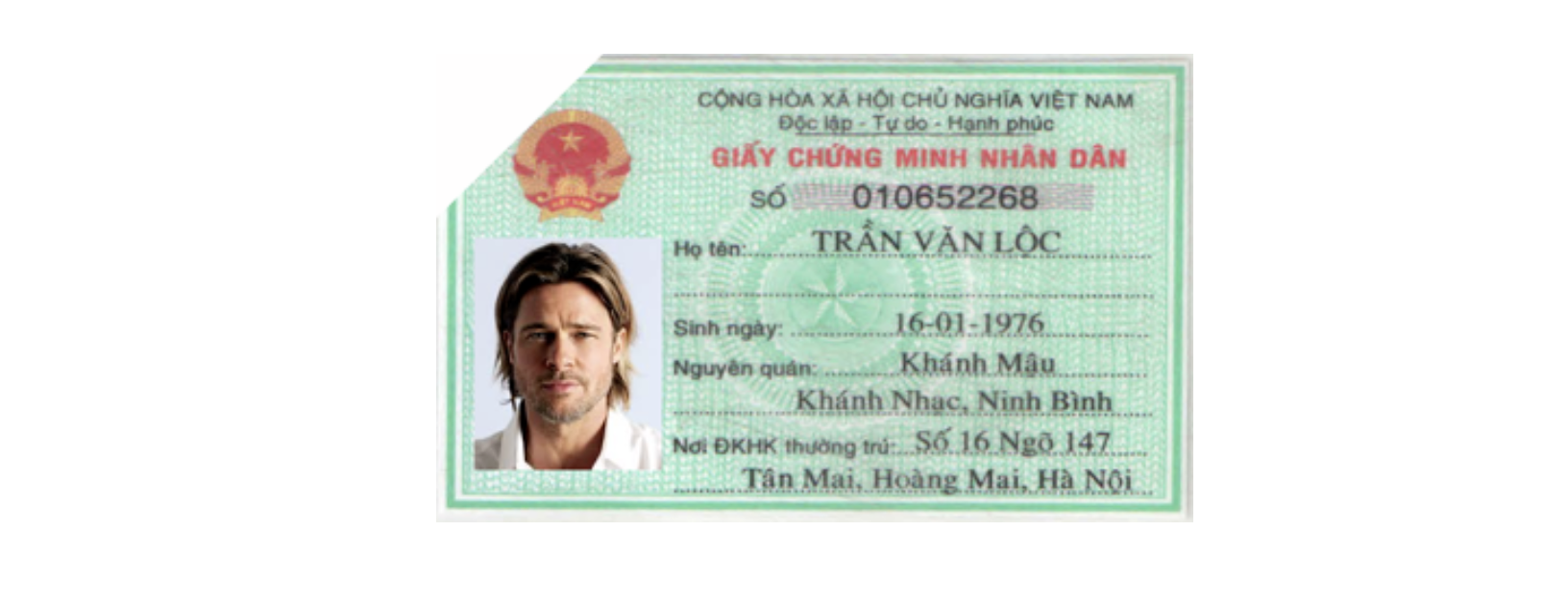
Quality Checks
Following are the quality checks supported by the National ID API:
-
Blur Detection: Detect if the fields in the National ID image are blurred.
-
Glare Detection: Detect if there is any glare on the image due to flash light etc.
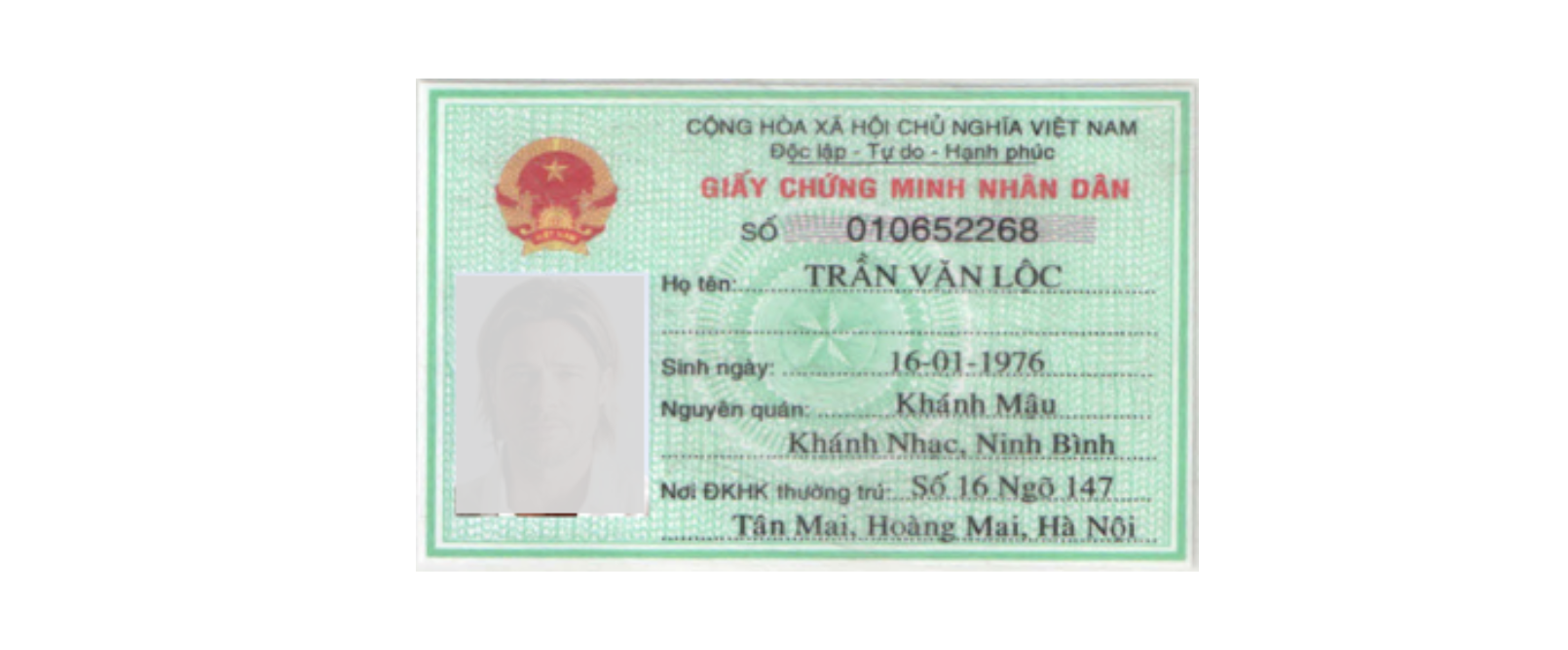
-
Face Detection: Detect if there is a face present on the card.
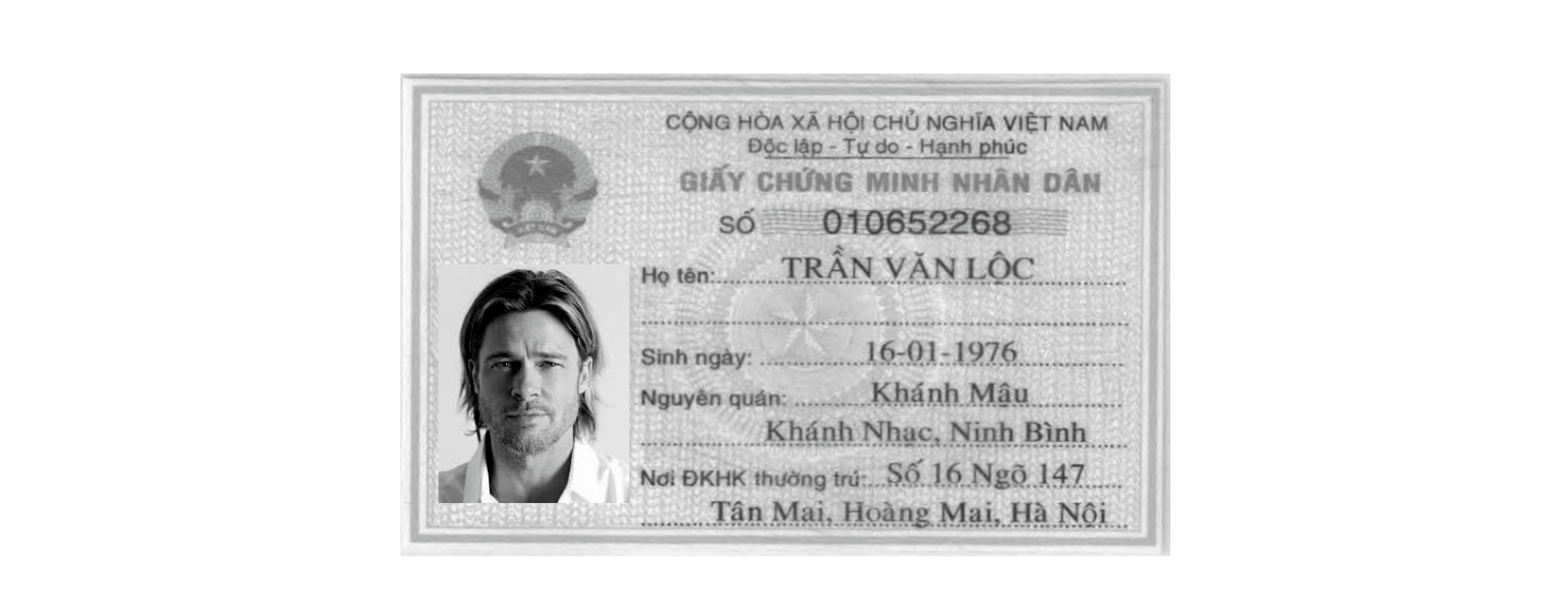
-
Black & White Detection: Detect if National ID is a black & white photocopy.
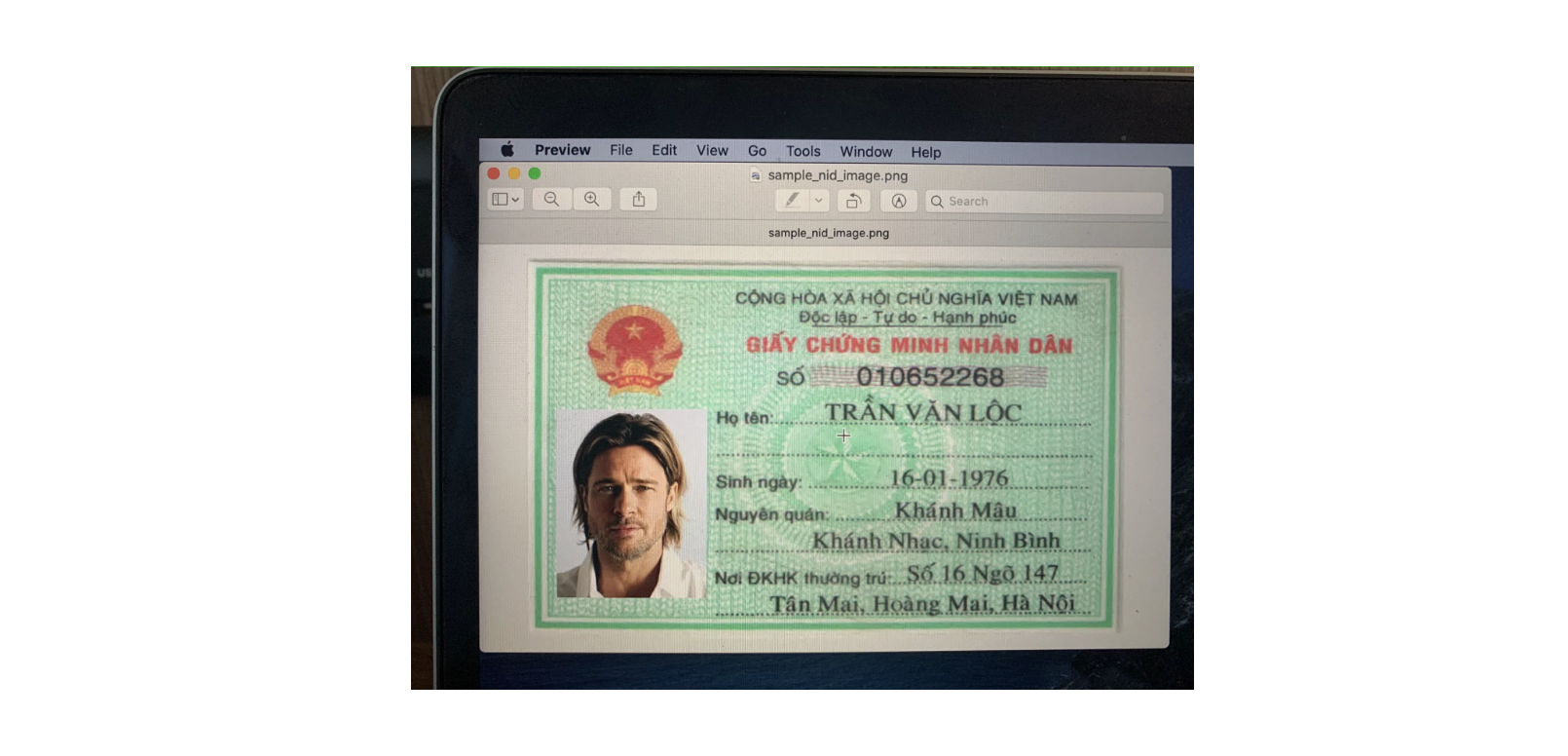
-
Captured-From-Screen: Detect if National ID is real or captured by showing image on a mobile phone or laptop.
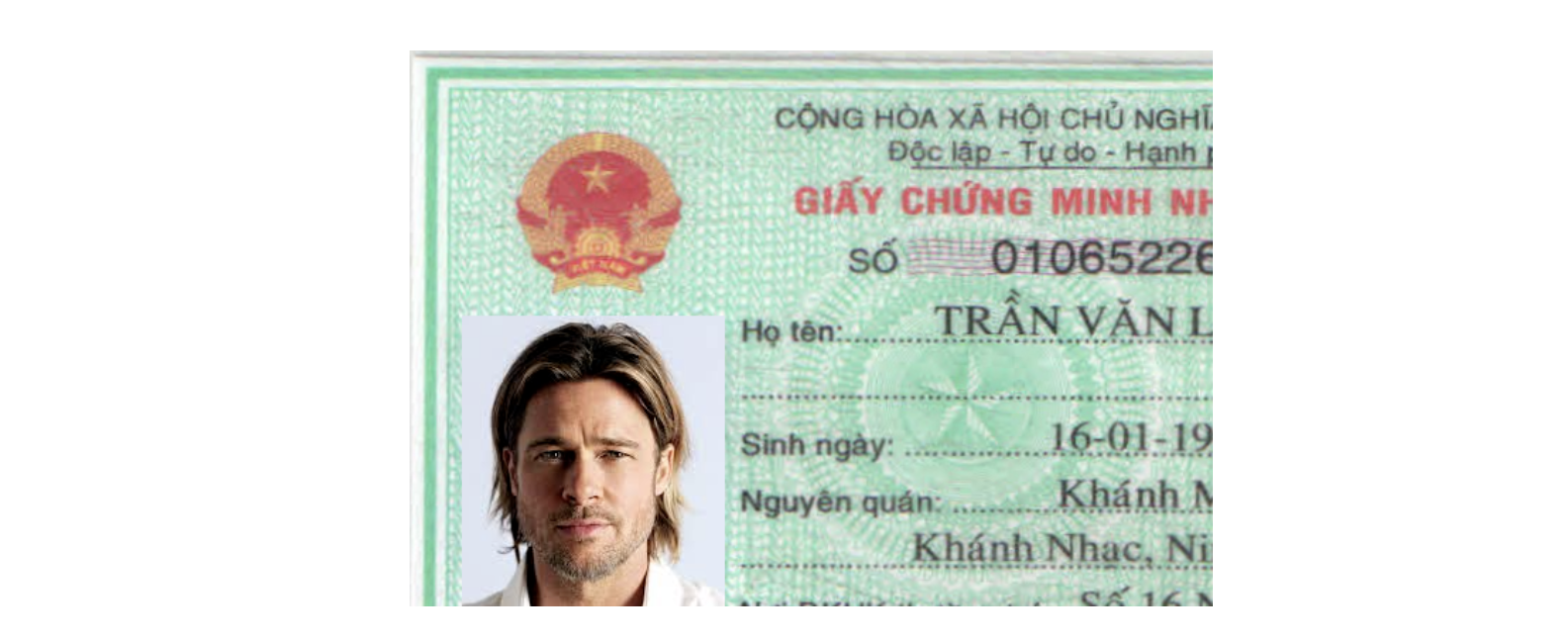
-
Partial ID Detection: Detect if any edge of the National ID image has been cut off or if there is any obstruction on the card.
Quality Check Details
| Quality Check Type | API Parameter | Prerequisite Parameter | Documents Supported | Response Field |
|---|---|---|---|---|
| Blur Check | blurCheck | qualityCheck | cmnd_old_front, cmnd_new_front, cccd_front, cmnd_old_back, cmnd_new_cccd_back, cccd_chip_front, cccd_chip_back, cc24_front, cc24_back | blur |
| Glare Check | glareCheck | qualityCheck | cmnd_old_front, cmnd_new_front, cccd_front, cmnd_old_back, cmnd_new_cccd_back, cccd_chip_front, cccd_chip_back, cc24_front, cc24_back | glare |
| Face Check | faceCheck | - | cmnd_old_front, cmnd_new_front, cccd_front, cmnd_old_back, cmnd_new_cccd_back, cccd_chip_front, cccd_chip_back, cc24_front, cc24_back | faceNotDetected |
| Black & White Check | checkBlackWhite | - | cmnd_old_front, cmnd_new_front, cccd_front, cmnd_old_back, cmnd_new_cccd_back, cccd_chip_front, cccd_chip_back, cc24_front, cc24_back | blackAndWhite |
| Captured From Screen Check | livenessCheck | fraudCheck | cmnd_old_front, cmnd_new_front, cccd_front, cmnd_old_back, cmnd_new_cccd_back, cccd_chip_front, cccd_chip_back, cc24_front, cc24_back | capturedFromScreen |
| Partial ID Check | partialIdCheck | qualityCheck | cmnd_old_front, cmnd_new_front, cccd_front, cmnd_old_back, cmnd_new_cccd_back, cccd_chip_front, cccd_chip_back, cc24_front, cc24_back | partialID |
Tamper Check Details
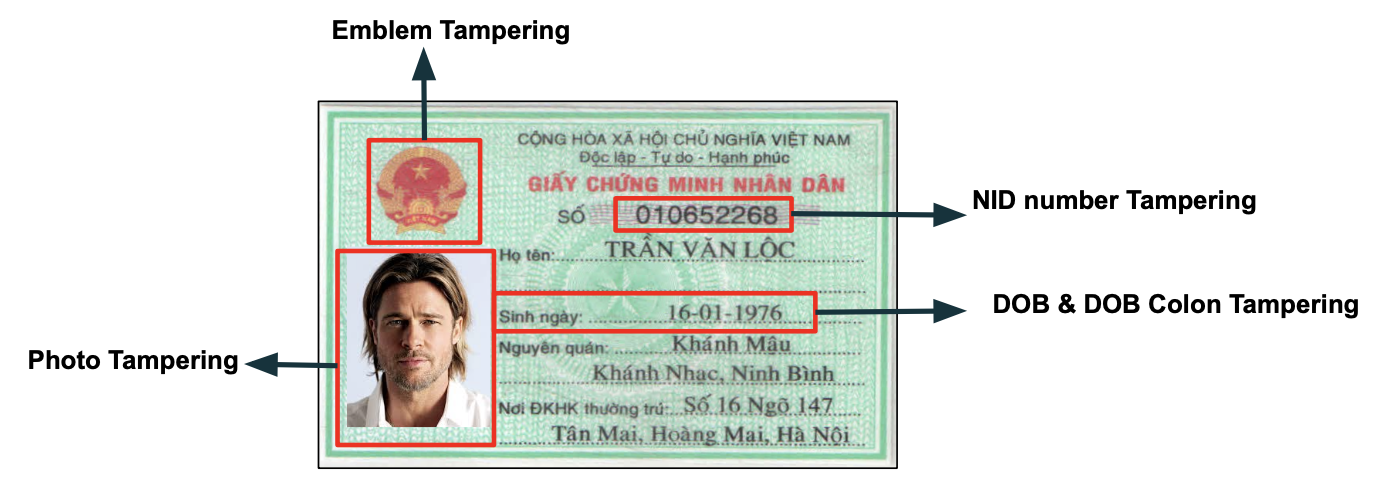
The following table lists all the ID Card tamper checks supported by the National ID API.
| Type of Check | Objective | Parameter | Documents Supported | Response Field |
|---|---|---|---|---|
| Enable Text Forgery and Photo Forgery Check | forgeryCheck | |||
| User Photo Tamper Check | It checks if the user photo on the image is tampered. | photoForgeryCheck
Prerequisite parameter: forgeryCheck | cmnd_old_front, cmnd_new_front, cccd_front, cccd_chip_front, cc24_front | photoTampered |
| National ID Number Tamper Check | It checks if the National ID number field on the image is tampered. | textForgeryCheck
Prerequisite parameter: forgeryCheck | cmnd_old_front, cmnd_new_front, cccd_front | idNumberTampered |
| Emblem Tamper Check | It checks if the "National ID logo" is tampered (only for front side). | emblemForgeryCheck | cmnd_old_front | emblemTampered |
| Date of Birth Tamper Check | It checks if the 'date of birth' field on the image is tampered. | dobForgeryCheck | cmnd_old_front | dobTampered |
| DOB Colon tamper Check | It checks if the colon is present next to DOB field on the National ID. | dobColonForgeryCheck | cmnd_old_front | dobColonTampered |
Rule Check Details
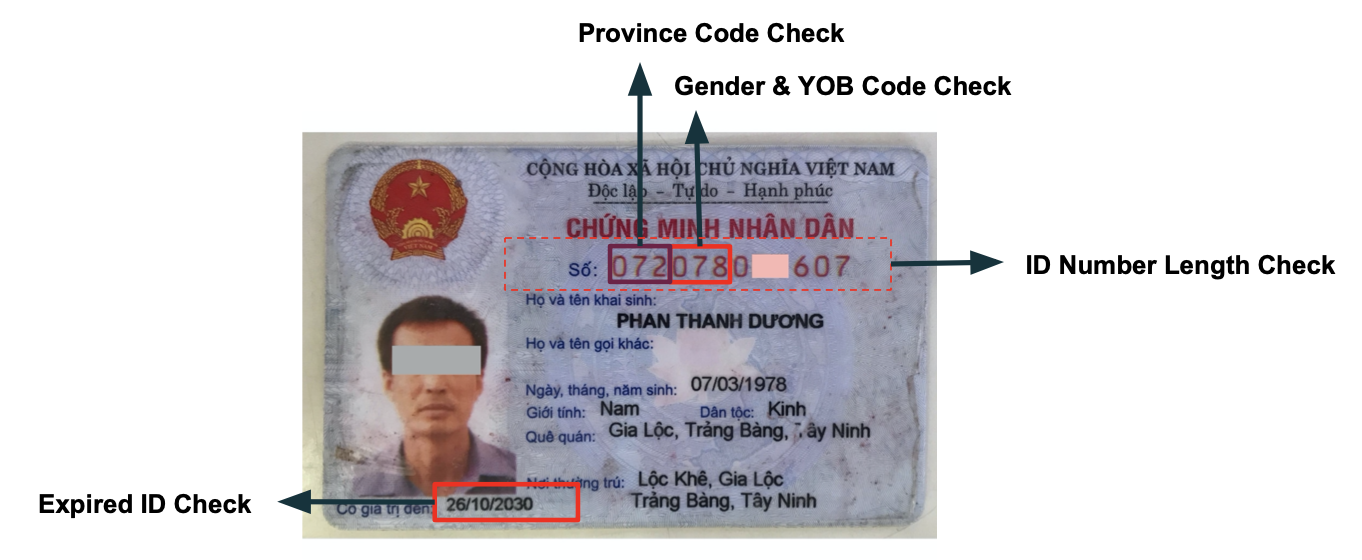
The following table lists all the ID Card tamper checks supported by the National ID API.
| Type of Check | Objective | Parameter | Documents Supported | Response Field |
|---|---|---|---|---|
| ID Province Code Validation | It checks if the province code in the National ID Number is valid It either verifies if the first two digits for an old NID or the first three digits for a new citizen ID is present in the list of province codes. | checkProvinceMismatch | cmnd_old_front, cmnd_new_front, cccd_front, cccd_chip_front, cc24_front | idProvinceCodeInvalid |
| YOB & Gender Code Validation | It checks if the date of birth and the gender matches the code in the National ID number. This is only applicable for the new National or Citizen ID. | enableGenderAndDOBMismatch | cmnd_new_front, cccd_front,cccd_chip_front | idDOBGenderCodeInvalid |
| Date of expiry validation | It checks if the date of issue is past the date of expiry. | expiryCheck | cmnd_new_front, cccd_front, cc24_back | expiredID |
| ID Number Length Check | Check if length of the ID number is correct | idNumberLengthCheck | cmnd_old_front, cmnd_new_front, cccd_front, cccd_chip_front | idNumberLengthCheck |
| MRZ tamper check | It checks if the user photo on the image is tampered. | mrzTamperCheck | cccd_chip_back, cc24_back | mrzTamperCheck |
MRZ Tamper Check Details
Details of the feature:
- The fields, 'ID number', 'Name', 'Date of Birth', and 'Date of Expiry' from the MRZ are extracted as part of the OCR API call for the Chip ID and CC24 backside.
- The first two lines of MRZ will be validated to check if it is authentic or tampered. The 3rd line is not validated as part of this check.
{
    "status": "success",
    "statusCode": "200",
    "result": {
      "details": [
          {
            "fieldsExtracted": {
                "placeOfIssue": {
                    "value": "CỤC TRƯỞNG CỤC CẢNH SÁT QUẢN LÝ HÀNH CHÍNH VỀ TRẬT TỰ XÃ HỘI",
                    "to-be-reviewed": "no"
                },
                "doi": {
                    "value": "10-03-2021",
                    "to-be-reviewed": "no"
                },
                "mrz":{
                  "value":"IDVNM1630194589079163019458<<96305073F2305075VNM<<<<<<<<<<<8DO<<THI<HONG<MINH<<<<<<<<<<<<<<",
                  "idNumber":"123456789",
                  "dob":"07-05-1900",
                  "doe":"07-05-2023",
                  "name":"John Doe",
                  "nationality":"VNM"
                }
            },
            "ruleChecks":{
              "mrzTampered":{
                "value":"yes"
              }
          }
          "type": "cccd_chip_back"
          }
        ],
        "summary": {
          "action": "manualReview",
          "details": [
            {
              "code": "065",
              "message": "MRZ is tampered"
            }
          ]
        }
    },
    "requestId": "<Request_ID>",
    "transactionId": "<Transaction_ID>"
}