Passbook OCR API
API Description
Objective
The Passbook OCR API extracts the textual data from an image or document of a Passbook and returns it in a JSON format. The data fields extracted are as follows:
- Account Holder Name
- Bank Name
- Account Number
- IFSC Code
- Account Type
| Input | Output |
|---|---|
| An image or PDF file containing the Passbook | The textual information extracted from the document |
API URL
https://ind-engine.thomas.hyperverge.co/v1/readPassbook
API Endpoint
readPassbook
Overview
The API is RESTful and uses standard HTTP verbs and status codes. The responses are in JSON format and you should upload all images and files as form-data through a POST request.
Authentication
You need a unique pair of application ID ( appId ) and application key (appKey) from HyperVerge to verify your identity for accessing the API.
| Parameter | Mandatory or Optional | Description | Allowed Values |
|---|---|---|---|
| content-type | Mandatory | This parameter defines the media type for the request payload | multipart/form-data |
| appId | Mandatory | The application identifier shared by HyperVerge. You can find the details in the dashboard's credentials tab. | This should be a unique value. |
| appKey | Mandatory | The application key shared by HyperVerge. You can find the details in the dashboard's credentials tab. | This should be a unique value. |
| transactionId | Mandatory | A unique identifier for tracking a user journey | This should be both unique and easily associated with the user's journey in your application(s) |
Inputs
| Parameter | Description | Mandatory or Optional | Allowed Values | Default Value |
|---|---|---|---|---|
image | The passbook image file for OCR extraction | Mandatory | The file format can be JPG, JPEG, PNG, or PDF | Not Applicable |
Caution
- If multiple images are sent to the server in the same call, only one of the images will be read. Hence it is advisable to only send one image per call
- If the PDF file has multiple pages, only the first page will be considered for the OCR extraction.
Request
The following code shows a standard curl request for the API.
curl --location --request POST 'https://ind-engine.thomas.hyperverge.co/v1/readPassbook' \
--header 'Content-Type: multipart/form-data' \
--header 'appId: <Enter_the_HyperVerge_appId>' \
--header 'appKey: <Enter_the_HyperVerge_appKey>' \
--header 'transactionId: <Enter_the_HyperVerge_transactionID>' \
--form 'image=@"<path_to_passbook_image>"'
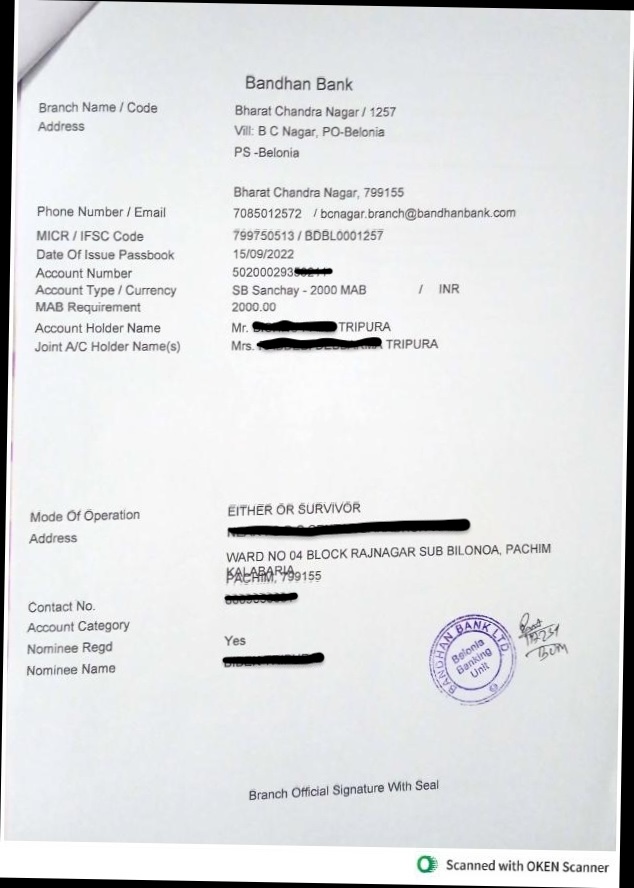
Document Sample
The following is a Passbook document.
Success Response
The following code is a success response from the API.
{
  "status": "success",
  "statusCode": "200",
  "result": {
    "details": [
      {
        "fieldsExtracted": {
          "customerName": {
            "value": [
              "<Account_Holder_Name>",
              "<Joint_Account_Holder_Name>"
            ]
          },
          "bankName": {
            "value": "<Bank_Name>"
          },
          "accountNumber": {
            "value": "<Account_Number>"
          },
          "IFSCCode": {
            "value": "<IFSC_Code>"
          },
          "accountType": {
            "value": "<Account_Type>"
          }
        },
        "type": "<Document_Type>"
      }
    ]
  },
  "metadata": {
    "requestId": "<Request_ID>",
    "transactionId": "<Transaction_ID>"
  }
}
Success Response Details
| Parameter | Type | Description |
|---|---|---|
| status | string | The status of the request |
| statusCode | integer | The HTTP status code of the response |
| details | array | An array containing the extracted information from the document |
| fieldsExtracted | object | An object containing the extracted fields from the document |
| customerName | array | The extracted names of the account holder and the join account holder |
| bankName | string | The name of the bank associated with the account |
| accountNumber | string | The account number extracted from the document |
| IFSCCode | string | The IFSC code of the bank branch associated with the account |
| accountType | string | The type of bank account |
| type | string | The type of document processed |
| requestId | string | The unique identifier for the request |
| transactionId | string | The transaction ID associated with the request |
Error Response
The following are the error responses for the API.
- Missing Image Input
- Input Validation Error- Image size
- Missing/Invalid Credentials
- Document Not Detected
{
		"status": "failure",
		"statusCode": 400,
		"error": "API call requires one input image"
}
{
		"status": "failure",
		"statusCode": 400,
		"error": "Image size cannot be greater than 6MB"
}
{
    "message": "Missing/Invalid credentials",
    "statusCode": 401,
    "status": "failure"
}
{
		"status": "failure",
		"statusCode": 422,
		"error": "Document Not Detected"
}
Failure and Error Response Details
The following table lists all error responses.
| Status Code | Error Message | Error Description |
|---|---|---|
| 400 | API call requires one input image | The request missed the image input |
| 400 | Image size cannot be greater than 6MB | The image size is larger than the allowed limit. |
| 401 | Missing/Invalid credentials | The request is either missing the mandatory appId and appKey combination or has invalid values |
| 422 | Document Not Detected | The image file in the request is not a valid Passbook document |
| 5xx | Internal Server Error | Please check the request headers or contact the HyperVerge team for resolution |