SDK Integration Guides
The following document gives an overview of the HyperKYC SDKs.
Overview
What does the SDK do?
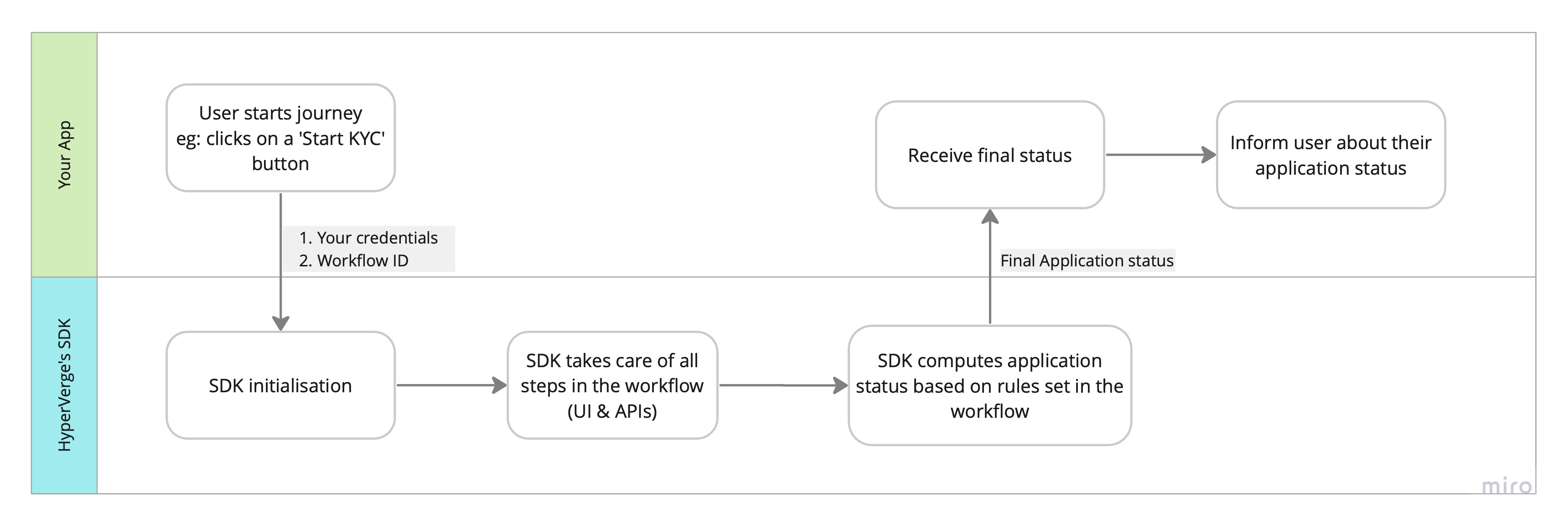
The SDK takes in a workflow of your choice and implements it end to end. The final results are returned to your app.
How does it work?
- SDK takes in the 'Workflow ID' of the workflow you want to integrate. This can be found on the dashboard
- SDK implements all the steps in the workflow, including user interactions, APIs, rules etc
- SDK returns final application status to your app
- Your app can now inform the user of their application status
SDK Integrations
We provide 5 different frontend SDKs. Visit the below pages to learn about how to integrate them:
Best Practices
The following best practices are recommended for all HyperVerge SDKs (Android, iOS, React Native, Flutter, and Web) to ensure optimal performance, security, and user experience:
- Generate authentication tokens from your backend server, avoid using raw API credentials in mobile applications
- Validate camera and microphone permissions before launching SDK (mobile platforms)
- Use secure storage mechanisms for sensitive verification data
- Use the latest SDK version for optimal performance and newest features
- Exclude unused SDK modules to reduce overall application size
- Implement proper error handling for network connectivity issues
- Ensure your domain is properly whitelisted (web platform)
- Use HTTPS for all production environments
- Consider prefetching configurations for faster load times (web platform)