Video OTP
Objective
The Video OTP module necessitates users to read aloud a dynamically generated one-time passcode (OTP) and verifies if the verbal input from the user matches with the OTP. It records a high resolution video of the user undergoing the verification process and additionally checks for liveness and face match.
It serves the following verifications:
- Verifies if the user's verbal input matches the displayed OTP,
- Ensures the user is distinctly visible and live which prevents fraudulent attempts using pre-recorded videos,
- Confirms that the same user completes the entire verification process.
| Input | Output |
|---|---|
| The user's selfie | It indicates whether the user's verbal input matches the displayed OTP, and provides the outcomes of the liveness and face match evaluations |
Supported Configurations
| Configuration Option | Description |
|---|---|
| Verification Checks | Configure the specific verification checks to be performed. This includes the speech to text(STT), liveness and the face match checks. |
| Mandatory or non-mandatory checks | You can further configure a check as mandatory or non-mandatory.
|
| Time Limit | Set time limits for users to complete the verification. Ideally, ensure that you tailor the time limit to accommodate longer OTPs. |
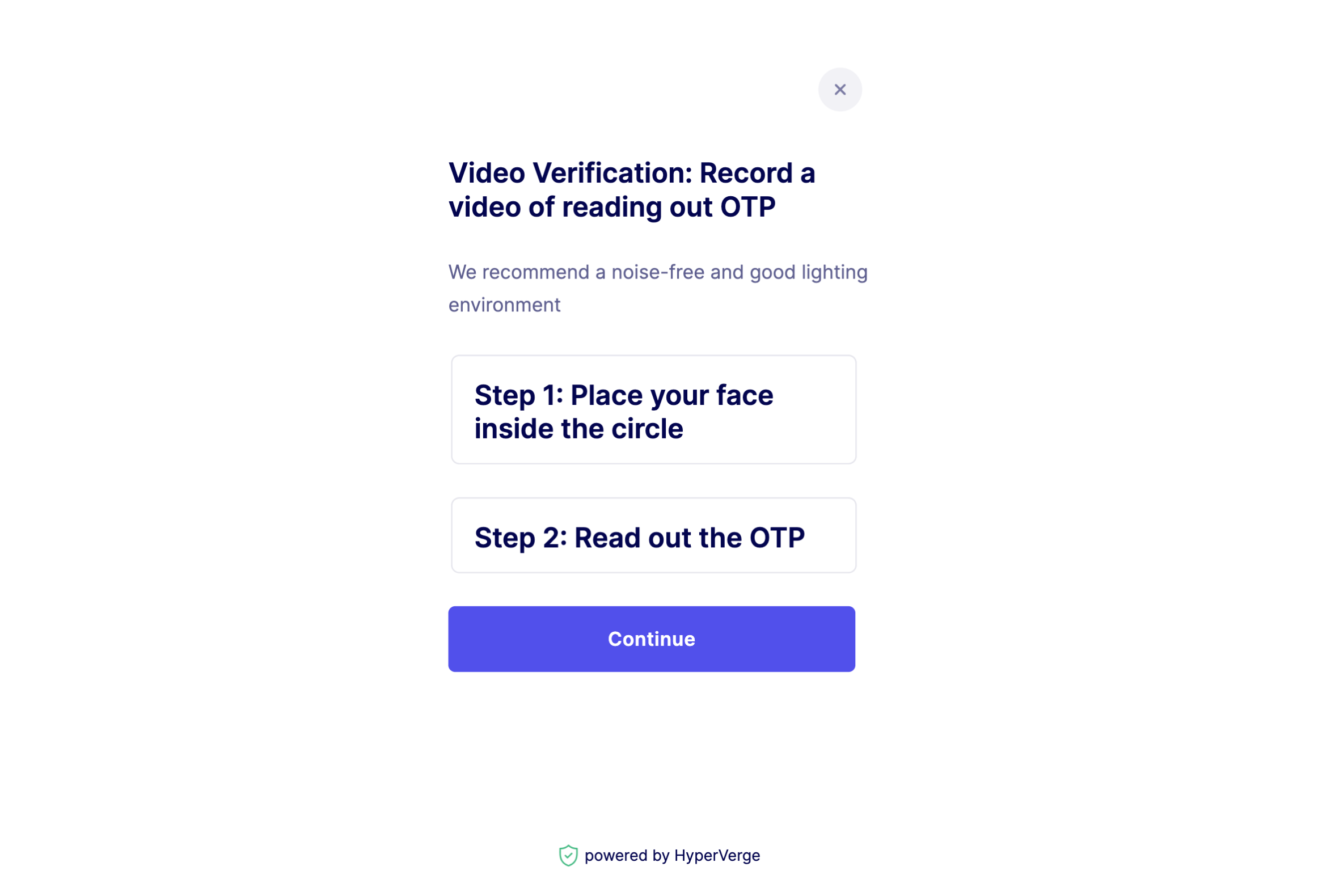
| Instruction Pages | Create instruction pages to guide users through the verification process. |
| Verification Restart Limit | Establish a limit on the number of times a user can restart the verification process. A restart is triggered when a user fails any of the configured verification checks. |
Sample Instruction
The following image shows an optional sample instruction page preceeding the OTP verification step. It can be configured to suit your workflow requirements.
Best Practices
For the best results during the verification process, consider the following tips:
- Speak naturally and clearly, maintaining a consistent volume and tone.
- Avoid background noise and ensure a quiet environment during the verification process.
- Pronounce each digit of the OTP as clearly as possible.
Success Response Sample
The following code is a sample of a success response from the module.
{
  "status": "success",
  "statusCode": 200,
  "metadata": {
    "requestId": "<Request_ID>",
    "transactionId": "<Transaction_ID>"
  },
  "result": {
    "workflowDetails": {
      "workflowId": "skyc_flow",
      "version": 1
    },
    "applicationStatus": "auto_approved",
    "results": [
      {
        "moduleId": "module_video_otp",
        "apiResponse": {
          "status": 200,
          "details": {
            "videoRef": "c173579c-abbd-4f83-9a15-a7f1263bad56_0",
            "statements": [
              {
                "statementId": "S_0",
                "startTimestamp": "00:00:00",
                "endTimestamp": "00:00:02",
                "statementText": "5423",
                "liveness": {
                  "apiResponse": {
                    "status": "success",
                    "statusCode": 200,
                    "metadata": {
                      "requestId": "<Request_ID_1>",
                      "transactionId": "<Transaction_ID_1>"
                    },
                    "result": {
                      "details": {
                        "liveFace": {
                          "value": "yes",
                          "confidence": "high"
                        },
                        "qualityChecks": {
                          "multipleFaces": {
                            "value": "no",
                            "confidence": "high"
                          },
                          "blur": {
                            "value": "no",
                            "confidence": "high"
                          },
                          "eyesClosed": {
                            "value": "no",
                            "confidence": "high"
                          }
                        }
                      },
                      "inputImageUrls": {
                        "image": "<Image_URL_1>"
                      },
                      "summary": {
                        "action": "pass",
                        "details": []
                      }
                    }
                  },
                  "requestId": "<Request_ID_1>",
                  "image": "<Image_URL_1>",
                  "results": {
                    "live": "yes"
                  }
                },
                "speechToTextMatching": {
                  "apiResponse": {
                    "sttOutput": "",
                    "matchResult": {
                      "match": false,
                      "verboseOutput": "",
                      "status": "FAILURE"
                    }
                  },
                  "results": {
                    "match": "no"
                  }
                },
                "speechToText": ""
              }
            ],
            "images": {}
          }
        },
        "attempts": "2",
        "previousAttempts": [
          {
            "moduleId": "module_video_otp",
            "apiResponse": {
              "status": 200,
              "details": {
                "videoRef": "c173579c-abbd-4f83-9a15-a7f1263bad56_0",
                "statements": [
                  {
                    "statementId": "S_0",
                    "startTimestamp": "00:00:00",
                    "endTimestamp": "00:00:02",
                    "statementText": "5423",
                    "liveness": {
                      "apiResponse": {
                        "status": "success",
                        "statusCode": 200,
                        "metadata": {
                          "requestId": "<Request_ID_2>",
                          "transactionId": "<Transaction_ID_2>"
                        },
                        "result": {
                          "details": {
                            "liveFace": {
                              "value": "yes",
                              "confidence": "high"
                            },
                            "qualityChecks": {
                              "multipleFaces": {
                                "value": "no",
                                "confidence": "high"
                              },
                              "blur": {
                                "value": "no",
                                "confidence": "high"
                              },
                              "eyesClosed": {
                                "value": "no",
                                "confidence": "high"
                              }
                            }
                          },
                          "inputImageUrls": {
                            "image": "<Image_URL_2>"
                          },
                          "summary": {
                            "action": "pass",
                            "details": []
                          }
                        }
                      },
                      "requestId": "<Request_ID_2>",
                      "image": "<Image_URL_2>",
                      "results": {
                        "live": "yes"
                      }
                    },
                    "speechToTextMatching": {
                      "apiResponse": {
                        "sttOutput": "5423",
                        "matchResult": {
                          "match": true,
                          "verbose": "Method Used: rule_based\nR: five thousand, four hundred and twenty-three \nH: five thousand, four hundred and twenty-three \n\nSimilarity ratio: 1.0\nDiff: []\nMismatches found = []\n\n",
                          "status": "SUCCESS!"
                        }
                      },
                      "results": {
                        "match": "yes"
                      }
                    },
                    "speechToText": "5423"
                  }
                ],
                "images": {}
              }
            },
            "attempts": "1"
          }
        ]
      }
    ],
    "applicantId": "<Applicant_ID>",
    "applicationId": "<Application_ID>",
    "modulesCount": 1
  }
}
Success Response Details
| Object | Field | Description |
|---|---|---|
| apiResponse | status | The API response status is 200, indicating a successful request. |
| apiResponse | details | Additional details about the analysis including video references. |
| apiResponse.details | videoRef | An identifier for the analyzed video. |
| apiResponse.details | statements | An array of individual statements that is displayed to the user and associated details. In this scenario, it is limited to a single statement comprising of the OTP. |
| apiResponse.details.statements | statementId | A unique identifier for each statement in the video. In this scenario, it is limited to "S_0". |
| apiResponse.details.statements | startTimestamp | The start time of the statement in the video (e.g., "00:00:05"). |
| apiResponse.details.statements | endTimestamp | The end time of the statement in the video (e.g., "00:00:13"). |
| apiResponse.details.statements | speechToTextMatching | Information about speech-to-text matching for the statement. |
| apiResponse.details.statements.speechToTextMatching | results | Indicates whether there was a match or not for speech-to-text. |
| apiResponse.details.statements.speechToTextMatching | apiResponse | Additional details about the speech-to-text analysis. |
| apiResponse.details.statements.speechToTextMatching.apiResponse | sttOutput | The speech-to-text (STT) output reflects what the module captured and converted to text. |
| apiResponse.details.statements.speechToTextMatching.apiResponse | matchResult | Details about the match status, status message, and similarity information. |
| apiResponse.details.statements.liveness.apiResponse.result.details.liveFace | value | Indicates that the face is live with high confidence. |
| apiResponse.details.statements.liveness.apiResponse.result.details.liveFace | confidence | High confidence in live face detection. |
| apiResponse.details.statements.liveness.apiResponse | inputImageUrls | Input image URLs for liveness detection. |
| apiResponse.details.statements.liveness.apiResponse.summary | action | The action is "pass," indicating successful liveness detection. |
| apiResponse.details.statements.faceMatch.apiResponse.result.details.match | value | Face match result is "yes" with high confidence. |
| apiResponse.details.statements.faceMatch.apiResponse.result.details.match | confidence | High confidence in face matching. |
| apiResponse.details.statements.faceMatch.apiResponse | inputImageUrls | Input image URLs for face matching. |
| apiResponse.details.statements | statementText | The text extracted from the statement. |
| apiResponse.details.statements | speechToText | The text obtained from the speech-to-text analysis. |
| apiResponse.details.statements | faceDetection | Indicates whether a face was detected in the statement. |
| apiResponse.details.statements | liveness | Indicates whether the face detected appears to be live. |
| apiResponse.details.statements | faceMatch | Indicates whether the face detected matches a reference face. |
| attempts | Indicates the serial number of the attempt for the analysis. | |
| previousAttempts | An array that contains information about previous attempts. |
Application View
The following image shows the information about the Video OTP module for a sample application available under the Applications tab of the HyperVerge dashboard.
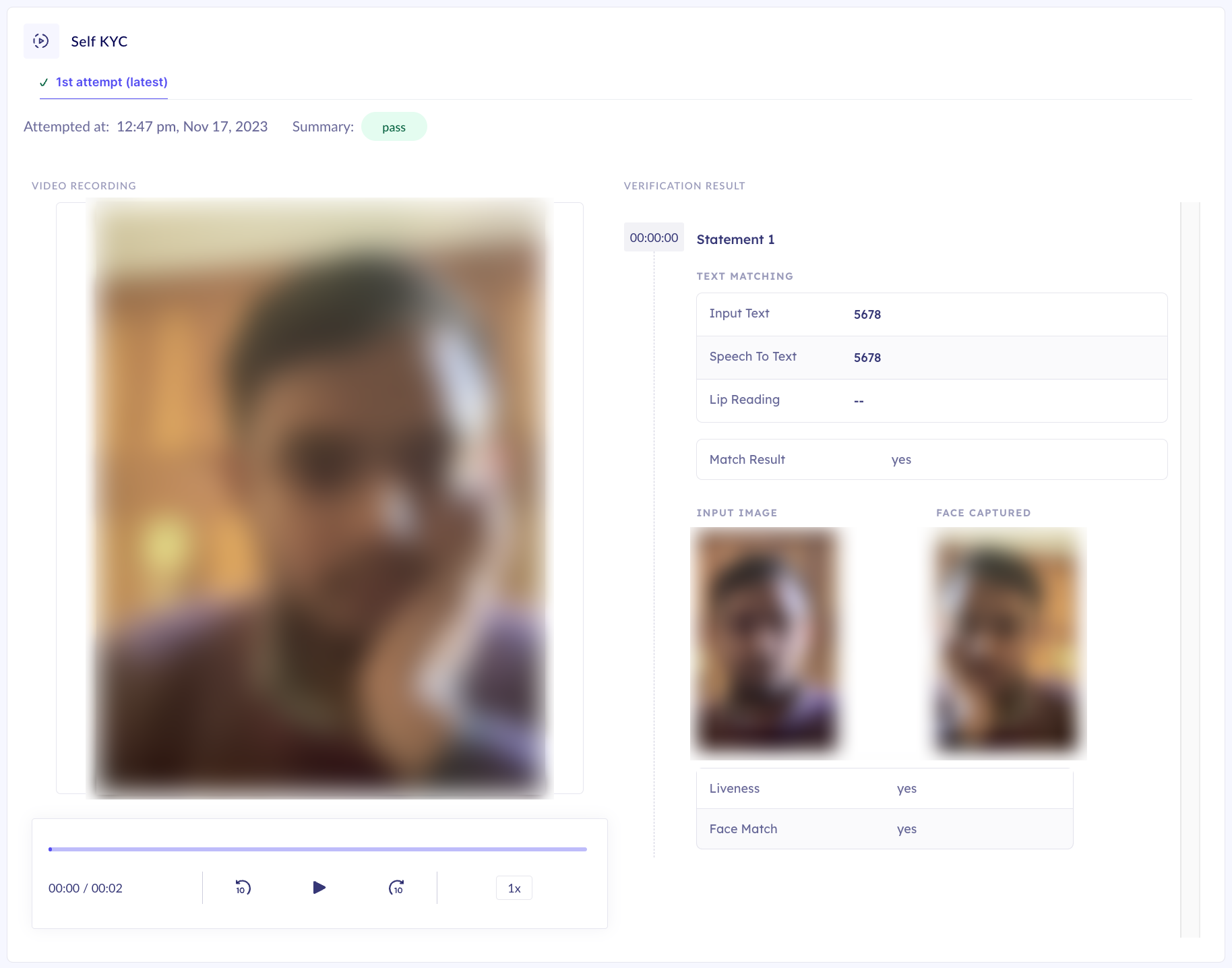
The user's image has been intentionally blurred for representation purposes.
Application Details
The application view displays the recorded video of the user undergoing the verification process and provides the result next to it as shown in the previous image.
The following table describes the fields available in the view.
| Field Name | Description |
|---|---|
| Attempted At | The timestamp of the verification process |
| Summary | If the field value is "pass", it indicates that the application has passed all the configured checks in the module. Otherwise, it reflects a "fail" value. |
| Input Text | The actual OTP displayed to the user |
| Speech to Text | The verbal input of the user against the displayed OTP as captured and converted to text during the verification process |
| Lip Reading | The field is not applicable at present |
| Match Result | If the field value is "yes", it indicates that the OTP displayed to the user and the verbal input from the user matched. |
| Input Image | Displays the selfie of the user captured (or provided as an input) as a prerequisite to the Video OTP verification |
| Face Captured | Displays a snapshot of the user's face captured during the verification process |
| Liveness | If the field value is "yes", it indicates that the user passed the liveness verification |
| Face Match | If the field value is "yes", it indicates a successful face match verification between the Input Imageand the Face Captured images |